How InternVL3.5 Decouples Vision and Language for Efficiency
Chapters
0:0 Introduction to InternVL3.54:32 Innovative Architecture
15:2 Training Process
18:40 Supervised Fine-tuning (SFT)
20:29 Reinforcement Learning (RL)
29:1 Visual Consistency Learning (VICO)
41:57 Decoupled Vision-Language Deployment
00:00:00.000 | okay so hi everyone today i want to see inter bl 3.5 which is advanced open source multi-models
00:00:17.040 | in versatility reasoning and efficiency so the the why we choose this paper is because we wanted
00:00:25.840 | to have some open source multi-modality available to be able to compete with commercial model so every
00:00:34.480 | integration that you want to develop as an ai engineering now the bar or the standard will
00:00:42.320 | require to have multimodal capabilities so having this addition and see how it works is what it would
00:00:51.280 | be is is what will make you competing into the market so this this paper not only provides how
00:01:01.200 | they did it but also gives tips for the developer community to actually improve in their workflow
00:01:10.080 | in general so this paper is really good about it and so just things to keep in mind while i'm going
00:01:18.880 | through the slide the gray slides will be things that are not in the paper but i find it helpful to
00:01:25.680 | explain so we can kind of have something or have some baseline for explain what we what i saw in the
00:01:33.200 | papers and also i prepared a notebook for inference that will be referencing when when we when when we
00:01:42.000 | we need it so let me start here and also we will have breaks between sections so we kind of go over
00:01:50.320 | questions or ideas that you want to share so the overall idea is that you want have a multi-modality
00:01:59.200 | and these compose about text and image so you put your image you put your text so we wanted the image be
00:02:07.120 | process by this inter bl 3.5 and the text process to the language model or the language capability which
00:02:15.120 | in this case would be quen 3 and gpt open source and we wanted to be this versatile have reasoning
00:02:23.760 | capabilities and be efficiency and that's what this old paper is about so we are going to dissect
00:02:31.120 | those three core functionalities of the inter bl 3.5 so like i i just prepared this type of of of
00:02:42.080 | of this response so we can kind of understand what are the differences and you see we here we have four
00:02:50.960 | like four different type of response based on the different on the different models that they provide
00:02:57.920 | or at the different stage that that they provide at the model and you will understand that more in a
00:03:03.360 | bit but this is the response of pre-training and you will see the picture that i referenced to
00:03:09.360 | later but just keep in mind the different type of response this is a dog sitting on a rock in front of
00:03:16.800 | a building and the instruct model which is the next stage that they did is a fluffy white dog wearing a
00:03:23.840 | rainbow custom with a leech sitting on a rock surface under a clear blue sky with a shirt visible on the
00:03:31.280 | background and then the next stage for them was the order response that they provide for the next stage
00:03:38.640 | is smile white dog dressing a colorful rainbow alfie and wary bunny ears and standing on a rocky surface
00:03:45.120 | and you get the idea that they get different type of response at different stage and the reason why all
00:03:51.680 | sounds i mean reasonable within a picture of of of a dog in certain position is that the they initialize
00:04:01.360 | with the already language capabilities from the open source so even though that they might not understand
00:04:08.720 | fully the the the picture you might get the impression of a working solution so that's why they run a lot of
00:04:17.760 | experiments to actually understand if this is going somewhere or it was the the language making you
00:04:25.280 | believe that it was a reasonable answer without knowing the the the without really understanding the picture
00:04:31.760 | so yeah so i hope that would be helpful as introduction so let's go to the abstract and this the
00:04:41.440 | inter bl 3.5 which is a new family of open source multimodal models and the this advancing versatility
00:04:49.600 | reasoning capabilities and inference efficiency along the inter bl series and the key innovation that
00:04:58.640 | they did is that they add a cascade reinforcement learning framework which enhance reasoning through a two-stage
00:05:06.160 | process offline reinforcement learning for stable convergence and online reinforcement learning for
00:05:12.480 | refine alignment and you will see for me this was one of the most brilliant ideas that they provide
00:05:18.240 | and we will see this in detail and the other thing was that they proposed a visual resolution router
00:05:25.200 | and i was impressed by this because it's so simple but so effective that you can incorporate in your workflow
00:05:32.240 | web on whenever on whatever you are doing so it's one of those things that make you think why i didn't
00:05:38.880 | think about it or because it's so simple but it's so effective and that allows to dynamically adjust the
00:05:46.080 | resolution of visual tokens without compromising the performance and they also separate the vision from the
00:05:52.800 | language from the language from the language server so they deploy in in different parts is not in a sequence
00:05:59.680 | is is they running in parallel so they separate the vision and color from the language model across
00:06:05.920 | different gpus and this is what adds the the efficiency of the model in the training and the inference stage
00:06:17.920 | so yeah so those are the three core ideas enable reasoning through cascade reinforcement learning adjust
00:06:23.280 | dynamically the vision resolution token and separate the vision from the language model
00:06:29.760 | so this is kind of to give you an overview on on the overall performance and the key thing about
00:06:38.800 | this graph is that they are able to compete with the with the most or or the latest commercial models like
00:06:45.760 | gpt5 of gemini 2.5 pro but also the they they are able to do it across the different release that they
00:06:54.560 | did so you you see here that we have interview 3.5 app this is the the the most advanced model that they
00:07:01.280 | released but they release but they release also other models which gives flexibility to developer to use
00:07:08.080 | in in different in in different areas or in different settings using different computational capabilities so
00:07:16.800 | this is one of the of the of the of the advantage of this paper
00:07:22.400 | okay so they they have three main contributions so the first one is the release of the
00:07:30.880 | inter bl 3.5 series and through our series of models that goes from 1 billion to 241
00:07:38.560 | billion and in both dense and mixture or of expert models also they include cascade reinforcement learning
00:07:46.720 | and the visual resolution router router and the couple visual from the language deployment
00:07:53.120 | and also they are able to compete with the commercial models available like gpt
00:07:58.000 | like gpt5 so this is was the main addition that they have so any questions so far about the introduction
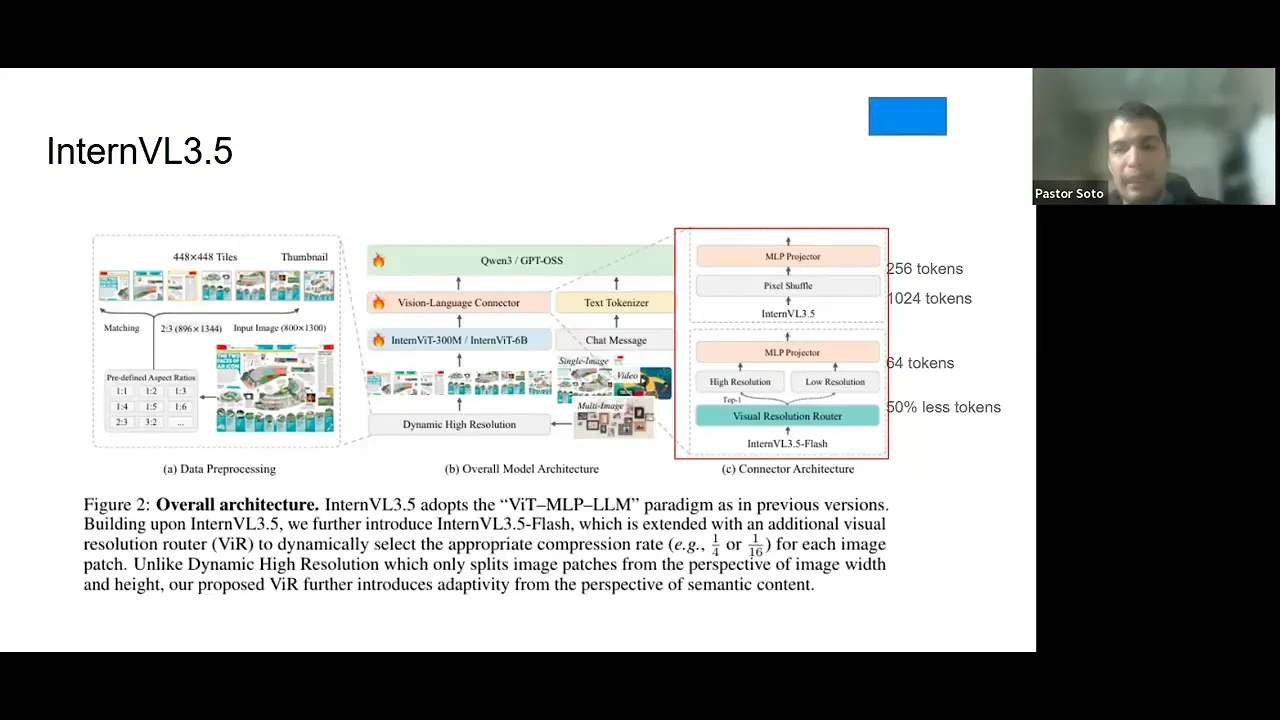
00:08:11.920 | okay okay so let me go through the architecture so this is where we are going to spend the most amount of
00:08:26.720 | of time on this on this on this on this discussion and you see in the middle that we have the core
00:08:33.760 | architecture of of inter bl 3.5 and as as you can see we have on the size we have a close up to through two different things one is the dynamic high resolution and the other one is from the visual language connector
00:08:50.000 | so essentially what we are doing here is is that is that we are processing the image so we have an image and and we process that image
00:08:59.120 | image and based on the on the height and width of the image we we process that image into a predefined
00:09:07.280 | aspect ratio so we we don't process any image with the rate with the with a with their initial high-end
00:09:14.800 | width but we process and we use our predefined height and width based on on on on what they did and let me show
00:09:21.920 | you what i mean by that in this notebook
00:09:24.640 | okay so can you see the notebook right okay so you you here you see we put the image and we have this
00:09:40.000 | function that is find the closest aspiration so it doesn't have any intelligence it just
00:09:44.560 | look your width and height of of of of your image and based on that it has the dynamic processing
00:09:51.680 | which is the we which is those those predefined aspect ratio that that i provided you and at the
00:10:00.160 | end we provide a process image so i use a picture of my dog which is the one that i show you at the
00:10:07.600 | beginning so you can see the blue sky you can see it has a a a rain a rainbow custom and it has this is the
00:10:16.080 | building or the church in the back and when we process this image we process the image and we go through
00:10:25.520 | patches and those patches are with predefined aspect ratio that we that that i will show you on this dynamic
00:10:33.680 | high resolution
00:10:34.560 | okay so we pass the image now we know what is a predefined aspect ratio and there is no intelligence in that it's
00:10:44.400 | just a bunch of if and else statement and it defines what's the closest ratio and based on that now that
00:10:51.680 | we process the image we can put it into the vision capabilities of of the of of the model so we can
00:10:59.440 | translate to a more to to to to go through the llms but before we go through the llm we need to process this image so we can kind of need a understanding on what the image is about
00:11:14.080 | right so we process that image so we process that image the way they did it they have two different
00:11:20.800 | through different ways of doing it the first one and that's the default one is just they they they grab
00:11:31.520 | the tokens of the patch of the image and from them they perform a pixel shuffle that goes that compress the image from
00:11:39.280 | 1024 tokens to 256 tokens so with this pixel pixel shuffle but the the brilliant idea and that's why
00:11:48.800 | i mentioned at the beginning that it was one of the ideas on why i didn't think about it right is that
00:11:55.600 | they have this visual resolution router and this is a classification model this is the the the classification
00:12:01.840 | model that decides if you need a high resolution of a low resolution based on a semantic meaning and let me
00:12:07.680 | show you what i mean by that so you see this picture of my dog right and you see that these these patches
00:12:15.040 | they're not the same they they they contain different different meanings and different ideas right so for
00:12:22.640 | instance here is a blue sky no matter if i see in a low resolution or if i of in a high resolution right
00:12:30.080 | but this it has the face of my dog and it has the the the color the it has on the back it has the church
00:12:38.400 | so i will say this has this has more semantic meaning that that that these that this one and that's
00:12:46.320 | essentially what the what this classification model does it tries to understand okay do i need this in
00:12:52.560 | high resolution or can i just use low resolution and the model will be able to understand either way or
00:12:58.480 | perhaps i need some details about it or on on this image and i'm and perhaps i need to capture more
00:13:05.040 | about the image so that's how they decide you go with this this visual resolution router and decide okay
00:13:12.160 | this patch is a high resolution or this spice this patch is a low resolution and with this idea they are able
00:13:19.840 | to reduce to 50 percent the tokens and so the compression after after the when you go to the mlp projector is
00:13:29.200 | is 64 tokens compared to 256 tokens so this was one of the most things that that that that impressed me
00:13:39.680 | because it was so simple to to to put it and yet they they they they were the one that that they did it and
00:13:47.600 | they don't like the the most important thing about this is that they don't lose
00:13:51.280 | any they don't lose information but it it it reduced this the the the inference time a lot and we will see
00:14:02.560 | on on on one of the latest experiments that they did so after we have that that image already processed and
00:14:11.760 | then and then and we if we go to the connect when we have the connection between that image
00:14:16.960 | between the image we can now pass to the large language model which is will be this open source
00:14:24.400 | model gpt open source or co entry and from them we provide an answer right and that answer as you can
00:14:33.520 | see you see here you see here this is a chat message this is a text token answer so this runs in parallel
00:14:38.800 | and we and we will see that more in details but the idea that i want you to take from this is how they
00:14:45.120 | process the image and how they did the big the the visual resolution rather to to spend less token and
00:14:51.600 | to speed up the process and then that they run the architecture in parallel they run the the vision
00:14:58.240 | and the in the language side by side
00:15:00.880 | so this is not part of the paper this is just resource that i used to put this together but
00:15:08.880 | the core idea of a pre-training is that you get a a full body of of knowledge it can be text it can be
00:15:16.320 | it can be code or it can be image and you want to and you want to predict the next token so given a
00:15:22.960 | sequence of token you predict the next token that's the pre-training stage so it's on is on level it's on
00:15:29.360 | level corpus of data and with the post training you actually add capabilities to the model so that's
00:15:36.800 | the the base the the the the core idea of the pre-training and the post training
00:15:41.680 | now we are going to understand how what they did at the pre-training stage so the first thing that they
00:15:50.000 | that they decide is that they they are going to use the next token prediction loss which is giving
00:15:57.280 | the sequence that we have here and this is a multi-modal sequence so you have text you have image
00:16:02.960 | you have yeah text and image you you you have a sequence and then you want to predict what's
00:16:09.360 | the probability of having this token so this token and you apply the negative log probability of this
00:16:16.880 | given this sequence what's the probability of having this token and you apply the negative log probability
00:16:22.800 | to that and you want to minimize that so this is the this is the negative this is the next prediction
00:16:30.320 | the next token prediction loss and to mitigate bias long to longer or short response they just square
00:16:39.200 | average to to to to to to to reweight this and and to avoid and to avoid having bias toward long way or short response
00:16:49.120 | the data for the pre-training straight stage was mostly private data proprietary data for for from them so they
00:17:00.880 | they use multimodal data and mainly image captioning general q a and text only data from the inter inter
00:17:08.960 | inter lm series and they are meant that data with open source data but this this data is private and
00:17:18.400 | they they have 160 million samples which is around 250 billion tokens and the text multimodal ratio is one
00:17:30.240 | text from 2.5 multimodal and they applied the max sequence length was 32 000 tokens which is around 48 pages
00:17:40.160 | so just kind of to give you an idea so this is to account longer long contextual understanding and reasoning
00:17:49.040 | okay the post training in stage and this is the secret sauce of this paper the the the post training
00:17:59.200 | so the post training has three phases that we are going to go one by one but they have the supervised
00:18:06.640 | fine tuning the cast core reinforcement learning and the visual consistent learning and as as i show you
00:18:13.600 | in the architecture they have two ways of doing of of doing the of of doing the the architecture one is
00:18:21.440 | with the flash model that use the visual resolution router that that i explained you that use the
00:18:26.720 | classification model to decide if you if you want high resolution or low resolution and the other one
00:18:32.480 | that doesn't have that that you have the two approaches and they test both and we will see that
00:18:38.320 | okay so let's start with the supervised fine tuning so the supervised fine tuning the the the the objective
00:18:49.200 | function is to is nest token prediction loss and the square average to avoid these to to avoid bias and
00:18:57.120 | they use the context window and they use the context window of 32 000 tokens and the data that they use
00:19:01.680 | they use instruction following following following data from intern bl3 they use multimodal reasoning data
00:19:08.320 | which is thinking data and capability expansions we will see in details what this data is about in in a
00:19:14.720 | later section but for now that's the over overall of the supervised fine tuning that they did
00:19:23.600 | this is also not part of the of the paper but just so we can kind of go into the same picture
00:19:29.120 | the offline the offline learning in in reinforcement learning for large language models what it does is
00:19:37.440 | that you have a prompt and you have a response so you have your csv file and you have prompt response
00:19:43.040 | and you test and you test that and you and you create a reward and so there is no generation in the
00:19:52.160 | offline learning while the online learning you have the prompt and for and from that prompt you generate
00:19:59.520 | response so that's the difference between one and the other and just and as you can see like this has
00:20:05.120 | difference in computational time and in computational research that they mitigate
00:20:10.480 | this one of was on the most clever things that that i saw from the paper because they they was able to
00:20:17.760 | mitigate these type of this type of computational difference between one and the other and they
00:20:24.640 | take advantage they took the best of both worlds essentially so now let's go to the to the cascade
00:20:32.160 | reinforcement learning so this cascade reinforcement learning has two stage one is mpo and we will see what
00:20:39.520 | this mean and the or and the other one is gspo let's start with the with the with the with the with the with
00:20:48.240 | the first one with this the offline reinforcement learning and so to give you an idea this reinforcement
00:20:56.320 | learning what it does is that introduce negative samples to prone low quality regions so something that that the
00:21:03.520 | model is is is is bad at or is is is giving bad response the advantage of of reinforcement learning is that it
00:21:12.640 | also shows you negative samples rather than supervised fine-tuning only shows you good examples the the
00:21:21.520 | reinforcement learning also shows you bad examples so that allows to enhance the overall quality of the
00:21:27.600 | model so usually offline reinforcement learning algorithms often offer a higher training efficiency
00:21:36.000 | but the performance is is so it is cappy or is lower compared to online reinforcement learning methods
00:21:45.440 | and but they the online reinforcement learning methods allows to have is time consuming and it's expensive
00:21:54.880 | to run because you generate a response through through through each prompt so for the offline
00:22:03.040 | reinforcement learning they use a mixing preference optimization which is composed by preference loss quality
00:22:09.120 | loss and generation loss and they try and and they try to that that's the the loss function that they
00:22:15.280 | use and they try to to to to reduce that with the with this offline reinforcement learning
00:22:21.120 | okay now we go to the gspo and before i jump into the gsp i want to show you this so just just so we can
00:22:33.120 | kind of understand where these things come from and we understand the map behind that or or or or the map
00:22:40.480 | formula so let me give you an example let's say you have a prompt and you wanted to and you ask a prompt
00:22:46.480 | what's 12 times 13 so these 12 times times or this prompt goes to a policy model this policy model what it does
00:22:54.240 | is that it generates several responses like you can see here one response no response and once you generate several
00:23:02.640 | a response those response those response goes to a reference model this reference model but what it does
00:23:09.680 | is that it tries to keep your policy your your generations within the boundaries of the gains that you get
00:23:20.960 | through the supervised fine tuning so we don't want to dba a lot from from from from what we already gain
00:23:27.600 | through the through the previous stretch to the to the previous stage like like the pre-training or the
00:23:34.640 | supervised fine tuning so we want that the model behaves within a central range and for that we use
00:23:41.120 | tile divergence so this this is the purpose of reference model to understand if one of the response is
00:23:47.040 | so it's deviating a lot from from from from the original model and and it penalized the model for
00:23:55.440 | that and the other thing that we and we have another model which is a reward model what it does is that it
00:24:02.720 | evaluates each of the response and it generates a reward for for for the response let's say for the first one which
00:24:10.160 | is the correct answer it shows that is plus 10 and this one this is is a wrong answer so it's minus five
00:24:18.560 | and this one is a right answer but it's providing information that didn't ask so it's is better than a
00:24:26.240 | wrong answer but it's not the best answer so when we wanted to have it in the low in a lower rank so we put it
00:24:34.560 | on plus a after we have the reward for all the response this goes to a group calculation
00:24:41.200 | which is taking the average of this reward and take the standard deviation and subtract each
00:24:48.320 | each each mean and standard deviation from from from the reward that you have here so it's kind of like
00:24:56.160 | a a a a a c score but you here is called the advantage so that's the advantage of the model so it's
00:25:05.680 | five standard deviations away from the mean of the overall response that that do generates and this
00:25:13.600 | go back to the policy model the main difference between the gspo and the grpo which is the previous
00:25:20.560 | one this one this was introduced the gspo was introduced by by deep seek recently and the main
00:25:27.280 | difference with the grpo which was used previously is that this is applied to the sequence so in so this
00:25:35.280 | sequence 12 times times 13 is equal to to 156 the advantage is applied to that sequence to the full sequence
00:25:47.760 | and rather than then grpo it was applied to each individual token so this allows applied to the
00:25:55.920 | sequence allows stability to the model and and that it it doesn't deviate much from the
00:26:03.120 | from from from the already gains now that we understand that let's go to understand the math
00:26:11.040 | so remember that i told you that the advantage was just taking the mean and the standard deviation away
00:26:16.240 | from from from the actual result so this is the reward this is the brown and this is the response
00:26:21.840 | so this is what i i i told you that it was plus 10 for the for the right answer and you subtract the
00:26:29.280 | mean from all possible answers for all possible rewards and then this is the standard deviation of
00:26:35.920 | all possible rewards so it's just taking the mean and the standard deviation and that's the advantage
00:26:40.880 | that you then go to the to to the calculation and the the same goes here like it has it has a lot of
00:26:47.520 | things in it but it is not that complicated here the clip like this is the what what i mentioned that
00:26:57.280 | it was trying to keep the model within a standard behavior so this what it does is that it evaluates how much
00:27:04.560 | how you are deviating from from from the from the answer and it tries to keep the answer within a certain
00:27:12.160 | rate so this is essentially the divergence that you have from the model and this is the advantage that you
00:27:18.560 | got here so this is the this is exactly what i explained you on the previous on the previous slide but
00:27:26.560 | just with the with the math formula and this is the expected behavior from the old model and this is
00:27:32.640 | the minimize the divergence of the model and like try to push more for the higher vantage results and
00:27:42.640 | penalize for the high divergence response
00:27:51.200 | so what this casketo reinforcement learning so this you go to the mpo this is the first stage of the
00:27:57.760 | offline and then with those gains you go to the gspo which is the online and that has a lot to do with
00:28:05.840 | the data that we see we will see in a bit but essentially has is a two-stage process that the gspo or the
00:28:15.120 | online online online reinforcement learning takes advantage of the offline reinforcement learning and
00:28:21.120 | that speed up the process a lot and the overall idea is that this casketo reinforcement learning that
00:28:28.320 | they propose has better training stability and the per the performance gains achieved through through the
00:28:34.480 | mpo stage enhance the stability of the gspo stage and
00:28:41.360 | yeah and reduces sensitivity of the model improves the training efficiency
00:28:49.520 | and it has higher performance sales so the models with fine-tuning with mpo take fewer training steps
00:28:55.760 | to achieve higher performance in the in the in the later stage of the reinforcement learning
00:29:01.040 | so this this this this is the the final stage of the post training pipeline so you have here remember
00:29:12.560 | that i mentioned that we have two ways of doing this so this is the visual so this is the the visual
00:29:20.240 | consistent learning and this is the interview 3.5 flash so this got they call flash to the one that they
00:29:28.560 | actually put the visual resolution router which is a classification model that tells you if it is high
00:29:34.000 | resolution or low resolution mode or low resolution requirements for for for the patch of your image
00:29:42.240 | so this visual resolution or visual consistent learning has two stages as well it has the consistent
00:29:52.880 | the consistency training and the router training
00:29:55.440 | so let me try to explain this these formulas so we can kind of know the on the visual consistent
00:30:05.600 | learning what what it does so the first step is the consistency training so remember that i told you
00:30:12.880 | that this is this is a picture of my dog right like that that i show you in the kaggle in the kaggle example
00:30:18.880 | so what i did is that either i divided into patches and here we have a reference model so this reference
00:30:26.320 | model will put the image in high resolution so all all all all image that i put into the model it will
00:30:35.680 | it will create high resolution patches of the image without this vision resolution router without so it by the
00:30:43.280 | for it will be high resolution but then we have the the policy model the policy model what it does is that
00:30:50.080 | it creates a uniform sample that that goes through high resolution and low resolution so it adds compression and
00:30:58.720 | it adds and it has the high resolution it has two versions right so let's say this is the low resolution and this is the same image
00:31:06.240 | image so let's say this is the same image so let's say this is a high resolution right so this k l divergence
00:31:12.880 | compares the reference the the reference output with the with the with the policy model across the different
00:31:21.760 | the different the different compression rates of the image the high resolution and the low resolution
00:31:27.280 | and they do it this for all all all examples that that you have so the goal is to minimize
00:31:33.760 | this divergence essentially is answering the question if i put this in low resolution do i loss
00:31:42.560 | meaning into in in in the picture so if the answer is yes i might have to do something different and if the
00:31:50.720 | answer is no i can't compress this patch so this is now that they have that they go to the second stage
00:32:00.000 | with the which is the error training and it has it is a binary classifier what what they did is that they
00:32:07.040 | they leave everything custom so they they freeze the interview vit and the language capabilities and the in the
00:32:16.640 | projector and they only change the visual resolution router because um this is my assumption as you can
00:32:25.440 | see in in the first in the in the first slide that that i showed you that it has the different response
00:32:31.680 | you is it's difficult to actually tell what's the best model or or not because given that it has good
00:32:39.200 | language capabilities it can fool you to think that it's actually understanding and perhaps it's just
00:32:44.960 | inference based on what it grabs from from the image so they leave everything cons constant and they and
00:32:51.840 | they and they they tweak the the visual resolution router and you see here this is this is this is the
00:33:01.200 | high compression this is a high compression image or a low resolution image and this is is this is a high
00:33:07.520 | resolution image and they evaluate how much how much impact does this have is this is just a ratio
00:33:14.800 | comparison and it compare how much you you lose of the information based on the compression that that you did
00:33:22.000 | any questions so far
00:33:26.640 | yeah may i have a short question yeah yeah i yeah i i i i i'm wondering if i understand it correctly but uh
00:33:41.520 | do i uh like is it true that uh the idea of this task is to split an image based on the semantic value
00:33:52.960 | so like i i will ask based on a little bit physical properties of the material because this is what i'm
00:33:57.760 | working on mostly so if i have for example the uh volume representing some kind of density phantom like water with with something
00:34:06.960 | i think then this uh this uh this algorithm converts this into a different sizes of patches with different resolution
00:34:15.120 | depending of the heterogeneity of the certain region is it correct
00:34:18.960 | correct no so so yeah so so the the first stage they they they they create a they have a predefined
00:34:27.280 | aspect ratio based on the high of width of the image so without going to any understanding of the image based
00:34:37.120 | on the higher of the image that you put there they will decide what which one is the best aspect ratio so
00:34:43.920 | they kind of classify the the image based on that but then when you go when you go to the visual resolution
00:34:51.760 | router which like the whole purpose of this visual resolution router is to is to make more is to be
00:34:58.880 | efficient in in terms of the of the capabilities of your of your of your resource that that i will explain that in a bit but
00:35:09.920 | they they they buy into patches the image as i show you like with the picture of yeah and and decide which
00:35:19.680 | one of those patches needs a high resolution or a low resolution based on the semantic meaning and for
00:35:26.000 | that i use this yeah yeah so so in principle how how much information do you need to encode an information
00:35:33.200 | how how much data you need to encode and semantic information of the image uh based on the what is on
00:35:39.760 | the image yeah all right great exactly but yeah this is this is a machine learning algorithm so so
00:35:45.120 | we will like what what i show you here is the training stage but when you go to the inference so that
00:35:52.960 | that doesn't happen it's it recognized through the machine learning algorithm if you need a high compression
00:35:59.360 | or not but it doesn't decide based on your image in particular because you already did on the machine
00:36:05.200 | learning stage yeah calculating the cost cross entropy loss and everything yeah thank you
00:36:10.800 | i think yeah any any other question pastor i had a quick question they use the term pixel shuffle
00:36:24.160 | uh is that the method they're using for their compression i know it was right in that picture
00:36:30.160 | it's kind of an upper right but the compression actually happens before then so i wanted to see
00:36:35.280 | if that's just something different yeah yeah yeah great question so they they they actually have two
00:36:40.560 | versions of of this like of of so they have the inter bl 3.5 and the inter bl 3.5 flash
00:36:49.120 | so the the the the whole idea of the flash is is using the com the the compression through this vision
00:36:57.120 | resolution router so you go from a a patch that has 1024 tokens to 64 tokens while in the pixel shuffle
00:37:07.680 | which is a compression method that they use in the in the other version of the of the model they compress
00:37:15.600 | from 1024 tokens to 256 tokens so the this visual resolution router what it does is that improves by
00:37:25.200 | over 50 percent the tokens that you will use with without using this visual resolution router
00:37:32.160 | so it is there are two versions of of the model and they compare both i will show you when we run the
00:37:39.360 | experiment when we see the experiments but they they have two versions of this model and the whole
00:37:44.720 | purpose of using visual resolution router is to speed and efficiency of the resource and is the compression
00:37:52.160 | then used in that visual resolution router also pixel shuffle no so this the the compression on the
00:37:59.360 | visual resolution router is is is is made through the through deciding high resolution or low resolution
00:38:08.640 | okay thank you yeah any other question
00:38:17.280 | okay okay so so the data the data that they use for supervised fine tuning was in instruction following
00:38:29.680 | data from internet bl bl3 and it was reused from from the previous series of model and also they use
00:38:37.200 | multimodal reasoning data which is thinking data for having long thinking capabilities
00:38:42.640 | and also they use capability expansions data sets that includes
00:38:46.640 | general user interface interactions and scalar vector graphics
00:38:52.800 | so this data is private the supervised fine tuning data is
00:38:58.640 | is is is is is is private but the cascar reinforcement learning this is open source data so we do have access
00:39:06.080 | to this so for the on offline reinforcement learning we use the mmpr b 1.2 and it has 200 200 000 sample pairs
00:39:18.160 | but for the online reinforcement learning and this is what i mentioned that we take advantage of the offline is we use a the queries that was
00:39:28.080 | was between 0.2 and 0.2 and 0.8 accuracy on the offline reinforcement learning
00:39:34.000 | right so we take exo sample of that plus multimodal data set and they construct a new data set that is mmpr tiny
00:39:44.720 | which has 70 70 000 sample pairs and this is how the mmpr b 1.2 looks like so you have your image you have
00:39:55.600 | questions you have the chosen response and you have the rejected response that's why i mentioned that
00:40:00.560 | on the online online or the reinforcement learning shows you
00:40:04.960 | negative examples as well so you can prone low quality regions
00:40:09.520 | this is what i mean by that this you have rejected response and you have chosen response
00:40:15.760 | and this is how the data looks like it's available and again in hogging phase you can see questions
00:40:21.600 | chosen and rejected so you can see you can use it right now if you if you want it
00:40:27.680 | and for the online this is the mmpr tiny we do have access to this also in in in hogging phase so
00:40:37.040 | we can generate with the prompt we can generate the response and replicate everything what they did
00:40:44.960 | and this is this is for for for the the visual the the division router that i mentioned we had consistency
00:40:55.040 | training for it used the same data set that they supervised fine tuning and this they did it to
00:41:01.840 | retrain the the the original performance of this stage and for the router training which is
00:41:10.160 | we they use a subset of the supervised fine tuning composed primarily on on ocr and bqna examples
00:41:18.400 | and yeah so this enables resolution router to learn how to dynamically decide the compression of the image
00:41:29.600 | so the test time scaling so this is for reasoning capabilities so they actually said in the paper that
00:41:37.040 | this didn't add improvements to the model they only use this tool for reasoning benchmarks but it's not
00:41:47.200 | part of the of the model that they released they only use it for for for reasoning benchmarks so
00:41:53.920 | not much to say about this time scaling
00:41:56.480 | now i this was also a brilliant idea that that that they did so you this is the the the couple
00:42:06.640 | visual language deployment so usually you have your image and you have a text like describe this image
00:42:12.880 | right you put the image and describe this image so you have the image and you have the text component so
00:42:20.240 | the idea is that this goes through a visual model and the visual model process the image and then
00:42:25.520 | from this processing goes to the llm after it's processed so it goes in sequence you process the image
00:42:34.080 | then go to the llm and then you create the response and you do this in sequence right
00:42:39.520 | process the image read through the llm and as you process goes to the llm until you get your response
00:42:47.360 | so what they did is that they they did a efficient way of doing this by separating the vision from the
00:42:56.880 | language so you put your image and say describe this image you have your image and you have the text
00:43:02.480 | the text goes to the llm and the image goes to the vision of the model and they have a connector and but both
00:43:13.920 | are different servers and those servers have their own dpus and they they they they they don't you
00:43:21.680 | don't share environment between the between the language and the and the vision so as you can see
00:43:28.080 | as you process you connect with the language and you as you process you go to the language and this is
00:43:35.520 | already preparing the response so after you complete gen after you complete creating the the or or or or
00:43:45.120 | passing the image the process image you already have your response because this process in parallel so that
00:43:52.960 | was one of the of the key things for for for for this paper that actually improved the the the time
00:44:01.920 | in the the inference time because this is for the the the this is for the inference but also it serves
00:44:11.200 | for the for the for the training when they were running through the model right so it allows to speed up the process a lot
00:44:18.800 | so quick question on the previous slide so main speed up uh on the language model side is that the encoding
00:44:32.640 | is now faster is that it because the generation still has a dependency on the vid and the mlp right yeah
00:44:41.680 | yeah so so so so do you like the the encoder is not faster and what do you mean because in the sec in
00:44:51.680 | the lower half the input message essentially uh vid and mlp is encoding the image and the and the lm is
00:44:59.520 | encoding the text but in order to generate the response there's still a dependency on both
00:45:06.960 | so and i my understanding is that the general response is the one that takes the most time
00:45:10.640 | given how relatively short the instructions are relative to the output
00:45:14.720 | so or how does it or am i misunderstanding it because i see that the communication
00:45:21.120 | uh the yellow the yellow blocks it seems to be interspersed
00:45:26.240 | yeah so so what i understand for for from from the paper is that
00:45:32.080 | it so in in in like with this approach they process the image and then goes to the to the large language
00:45:40.400 | models so after the image is already processed right but with this approach they process image and they
00:45:47.040 | connect the image at the same time and they already preparing their response so for for like for instance
00:45:54.960 | with this picture right you see that we have any patches and and let's say we patch this and within
00:46:03.360 | that's the one that we pass first they already will be preparing the blue sky like that's why you
00:46:10.080 | understand perhaps it's oversimplification or on what is actually happened but what i understand is that
00:46:16.160 | it pass is so it's generating the response as you are processing the image without waiting for the full
00:46:24.720 | processing of the image i don't know if that makes sense that makes sense thank you uh that clarifies a
00:46:32.080 | lot thank you awesome awesome so yeah so this is the yeah so this is the the this is a picture of of the
00:46:43.440 | the protagonist of my story right so we go to the vision model the the image goes to the vision model
00:46:50.400 | and then the the the text goes to the large language model and they preparing the response side by side so
00:46:58.720 | whenever the picture is already processed we already have the our answer a fluffy white dog wearing a rainbow
00:47:06.160 | custom with a rocky surface wearing under a blue sky with a church visible in the background so it doesn't
00:47:13.680 | have to wait to have all the meaning is preparing the response as he as he as he processed the image
00:47:21.200 | questions so far
00:47:24.400 | i have a question actually can you go back uh previous slide yeah so in this example where you're showing
00:47:31.600 | your dog um and there's like a please describe this image shortly that's like a a prompt that carries
00:47:36.640 | along with it right yeah and so like um does the paper talk about uh the weighting between the textual
00:47:44.000 | prompt that comes with the image you know like how much of a difference does that make like or are they
00:47:48.160 | just encoded um separately and fed back in no so so i i i didn't saw anything about about describing the
00:47:58.320 | the the or separating like what your your prong was based on the image i i didn't saw anything related
00:48:09.360 | related to that and so follow-up question like you you you showed in the kaggle notebook that the
00:48:17.760 | the your dog picture it's a great picture by the way uh was like rearranged uh with the patching right and
00:48:23.200 | so like you've got the dog's head in a different area like the the the patching the repatching let's
00:48:28.880 | say of the image that's all happening independent of any prompt like it's uh it's doing feature
00:48:34.080 | extraction in a sense okay yeah yeah yeah yeah that's a subsidiary question yeah now i understand yeah so
00:48:40.640 | this this is independent so you process your image through through this vision model but that's
00:48:48.240 | independent on what you are providing here right like that's that's and yeah i mean that's a a great
00:48:56.000 | question because if you if you ask for details perhaps or details about right yeah it would influence
00:49:03.280 | how it does that that that patching step like yeah as the model like if i was like you know if the prompt
00:49:09.200 | instead was what color jacket is this dog wearing then i would only focus immediately on the jacket part
00:49:17.280 | and like i don't know like that i just feel like that would have sped up the process yeah yeah so
00:49:21.440 | i i i i i i i really don't know perhaps like it it is interesting question because yeah like you
00:49:29.760 | you that there would be other regions that might not that that important right so yeah yeah i i really
00:49:38.080 | don't know if if if they account for that but it would be interesting to test definitely if it may
00:49:43.760 | how i could do it on its own yeah excuse me if i may uh like the the patching is part of the vision
00:49:52.160 | transformer so uh that's uh just like when you're creating uh different tokens uh the issue with the
00:50:01.920 | image is that you divide it into different patches uh sequentially so you will lose uh uh you know context of
00:50:11.280 | the patches being close to each other as you go horizontally and then go back uh etc so that's
00:50:19.680 | my uh understanding of creating different patches but i have a different question
00:50:25.120 | uh because uh because you showed me uh for any uh image you have a question and then uh correct answer
00:50:35.520 | and wrong answer so in this case here for your question please describe this image shortly i know what
00:50:44.400 | what is the right answer but what uh do you actually provide a wrong answer uh for training or you know
00:50:54.720 | measuring the performance uh what wrong answer could you say yeah so so actually that's the training
00:51:02.480 | pipeline so on the training pipeline the data set that they use does have the the the wrong answers so
00:51:10.080 | it is on the on the on the on the data set that they use for for for for the reinforcement learning
00:51:16.400 | or the cascara first millennia that they did so in this stage we are using as inference
00:51:23.200 | so it doesn't have a wrong answer per se because you are running it's like you pro you provide this
00:51:30.160 | to chat gpt and and get a question is the inference stage but on the training stage that we did to this
00:51:38.240 | actually work like like it is working right now they do have they did use
00:51:43.840 | negative negative examples based on the data set that they use but it's on the data set that that
00:51:51.920 | they use on the training stage in the reinforcement learning portion i understand that that was in
00:51:59.360 | training but uh if you had an idea of you looked at this training uh what would be a wrong answer for
00:52:06.880 | such a question uh but that's if you don't know that's okay uh because we can look at that later
00:52:13.360 | on yeah i mean for me a wrong answer would be that if say if it is a ugly dog i wouldn't agree with
00:52:21.040 | that so yeah like like so something that that that perhaps doesn't describe us as as much and and as
00:52:29.120 | i show you let me show you let me show you this really quick where i compare the different models
00:52:34.720 | you see like one thing that that that i didn't like is the oversimplification because it's a dog sitting
00:52:42.000 | on a rock in front of a building i mean that that might be a wrong answer right because it's not a
00:52:48.560 | building per se or you know like i i would say it's a it's a it's a bad quality response and this this is
00:52:56.320 | response is the same model but on the pre-training stage it didn't go through the supervised fine
00:53:01.040 | tuning and it didn't go to the to the cascade reinforcement learning that we did so yeah i mean
00:53:08.720 | that would be an example because it doesn't fully understand the the image and also when i say shortly
00:53:16.240 | it describes every single detail on the mpo stage so that would be also an example of a not good answer
00:53:23.600 | for me at least
00:53:24.320 | okay so i i i won't go through details of all experiment i just select few experiments that
00:53:37.600 | that that that that was instructional for for for various purpose but the order like this is that
00:53:44.320 | they run a lot of experiments and most of them most of the experiments that they run actually actually
00:53:50.880 | have a good performance across different benchmark that that they use so i just picked a few experiments
00:54:01.120 | to demonstrate what what they did and how this can be useful so you can see here four different
00:54:09.200 | versions of the model so this experiment what's trying to prove if the cash card reinforcement learning
00:54:15.040 | actually actually work and if you actually need it and as you can see in all versions of the model
00:54:21.600 | it performs better
00:54:24.320 | in in in multimodal reasoning and mathematical benchmarks so the cascade reinforcement learning was a good addition
00:54:35.200 | you know in terms of providing or of of providing good performance and this is this this this is a core
00:54:44.720 | experiment because it allows to demonstrate why going through the cascade reinforcement learning matters
00:54:51.120 | and they what they did is that they compared the effectiveness of the instruct model
00:54:57.920 | with the mpo stage that remember is the first stage of the cascade reinforcement learning but also they break down between
00:55:06.480 | running only the mpo running only the or the offline running only the the the online two times and then running only the the cascade reinforcement learning
00:55:18.400 | the results are remarkable because with the mpo you can get a lot of a lot of a lot of performance
00:55:24.400 | a lot of of increase on your performance and it doesn't use a lot of gpus so
00:55:30.960 | a lot of gpu hours so so it was a great
00:55:34.640 | a great a great a great addition but with a gspo you you still have performance gains but at the cost of
00:55:44.720 | of thousands of thousands of hours of gpu usage and that is you run it if you only run one time but if
00:55:52.320 | you run two episodes of of gspo you you get up to 11 000 gpu hours and with just one percent of of
00:56:04.880 | performance gains while using cascade reinforcement learning that remember use mpo then gspo and the gspo
00:56:14.640 | use use use use as advantage the stability of the mpo stage of the offline of the offline reinforcement
00:56:22.320 | learning you only need half of the gpu hours to get a better performance so that's why adding the
00:56:30.880 | cascade reinforcement learning matters for these for these instruct bnt 3.5 and it's one of the great
00:56:39.280 | contributions to the community to understand where the direction of the models can be to to to do it
00:56:46.400 | efficiently
00:56:50.400 | so this is another and this is another comparison and this is a comparison of running of running
00:56:58.960 | flash we're running the the the default model so remember that flash use the visual resolution router
00:57:06.400 | that we mentioned that it goes high performance and low performance right or or low high resolution and low
00:57:12.800 | resolution with the image so as you can see the it's not better in terms of performance but it's not worse
00:57:21.520 | or it's not a lot of worse so and is able to to have a a different a a a good performance
00:57:31.440 | without cost without many costs and is able to speed up the process a lot and as you can see here we
00:57:39.120 | have the resolution different resolution of image so we pass this image this resolution of image or this
00:57:46.000 | resolution or image and we compare with base baseline the couple vision or the couple the language or from
00:57:53.680 | from from from from the vision and also the vision the division resolution router and this is the request
00:58:02.080 | per seconds so as you can see with this base we are able to to get more requests per second when we use
00:58:11.760 | these the couple of the vision and the language but also with the with these low resolution high resolution
00:58:19.440 | model so we are able to s to to have more requests per second and when we see that more is when we have
00:58:27.200 | a high resolution image like this one when the baseline have 1.5 around 1.5 requests per second we can
00:58:36.480 | we can increase to five requests per second which is a lot for for for for for this for this model
00:58:46.480 | okay so any questions this is this was the the the the final slide so yeah
00:58:56.160 | let me see
00:59:11.280 | yes yeah thank you thank you guys
00:59:19.920 | any questions comments auditions yeah yeah like we we get through to the hour by the minute so yeah
00:59:36.960 | thank you thank you so much guys i really enjoyed this thank you thank you
00:59:47.600 | a lot of fun preparing so thank you so much thank you bye bye bye bye bye guys take care