Claude Code Daily Tips Series
As a daily Claude Code user for the last 6 months, I’ve learned a lot about Claude Code and agentic coding in general. Trying this thing where I share 1 thing per day. I’m posting on LinkedIn but I’ll update this post with each tip.
Get these tips and more delivered to your inbox. Subscribe at lawrencewu.substack.com
Day 1 - /insights command
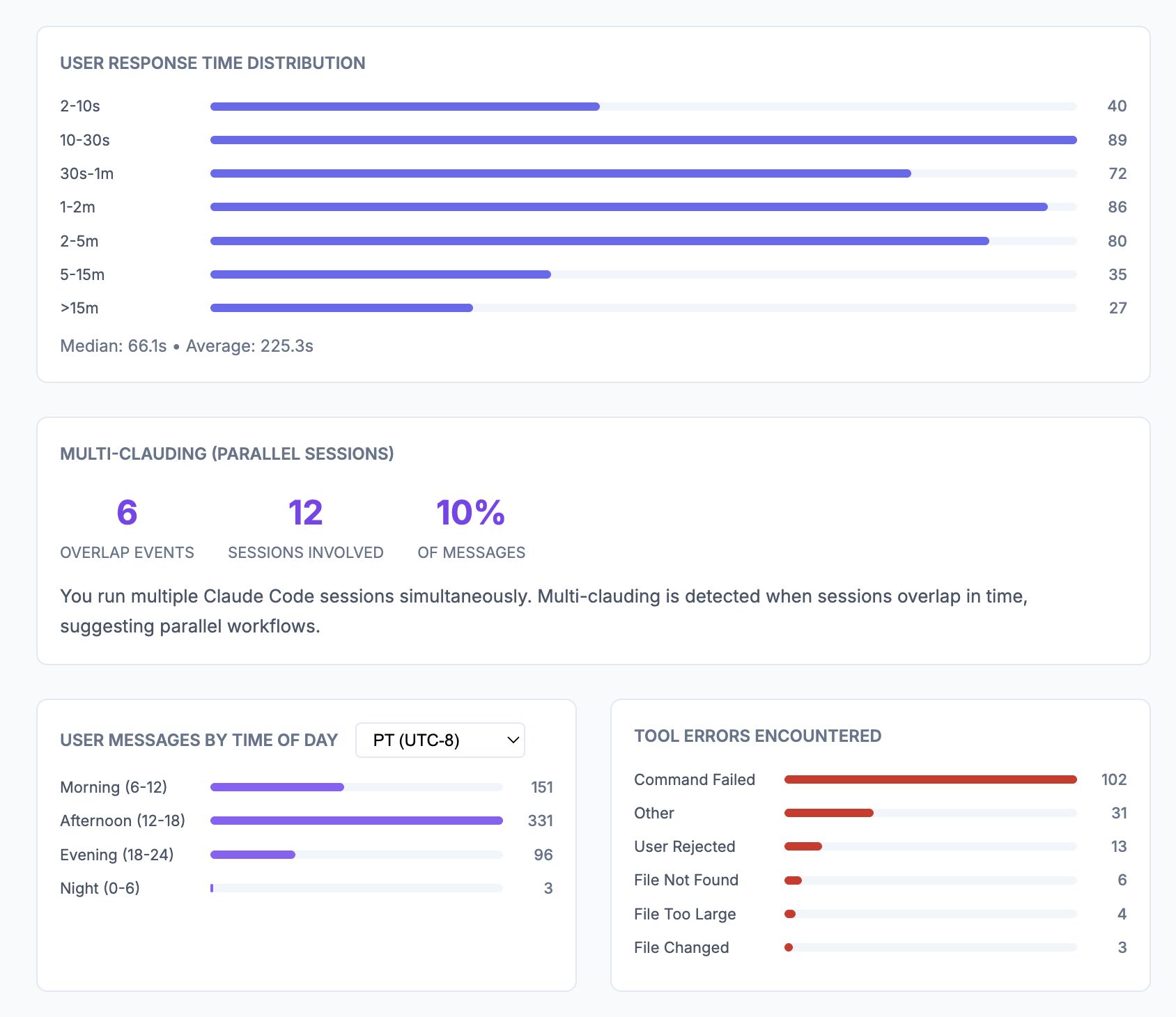
I tried the new /insights command in Claude Code in one of my main projects. It analyzed the last 30 days of messages in my project, identified how I work, noted “impressive things” I did, where things went wrong, suggested existing Claude Code features to try which included recommendations to updates to my CLAUDE.md, and new Custom Skills and Hooks to try.
Also neat to see all of the messages, tool calls and sessions labeled by type along with the distribution of my response time and how often I am “Multi-Clauding.” Finally, all those days of micro’ing while playing Starcraft and Warcraft III are paying off.
Day 2 - Standardize on AGENTS.md
If you use more than one coding agent like Claude Code and Codex, it’s helpful to standardize on one AGENTS.md. This is a file that gets loaded into the model’s system prompt and is great for steering the model. Claude Code hasn’t chosen to standardize yet and still uses at CLAUDE.md
Solution: Have CLAUDE.md with one line:
@AGENTS.mdThen just keep your AGENTS.md updated.
Codex will use AGENTS.md as normal. Claude Code will load CLAUDE.md and then load AGENTS.md because it’s referred to.
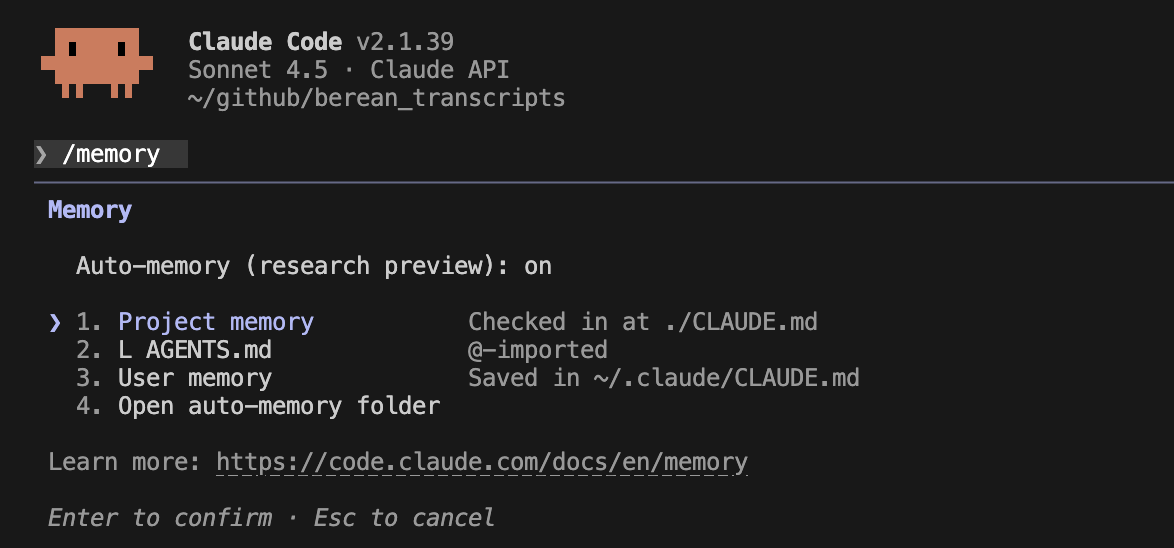
In Claude Code, if you type /memory, you should see under Project Memory your AGENTS.md referenced.
Day 3 - Self-Improving AGENTS.md/CLAUDE.md
Claude Code, codex and other agents will load AGENTS.md or CLAUDE.md into it’s context (really it’s system prompt) with every message. I’ve recently started being better about updating this file anytime I want to steer the coding agent. For example if the coding agent makes a mistake, for example if it forgets to add the region into a GCP URL, I started manually adding an instruction to my AGENTS.md, “when returning VertexAI URLs, they need location/{region}, here’s an example of one: {put your example url here}”. This worked, Claude Code stopped writing wrong URLs.
I then started creating sections in my AGENTS.md for different types of areas, e.g. data, machine learning, VertexAI, or Big Query to organize these conventions and gotchas.
Then I realized I could just prompt Claude Code to update my AGENTS.md for me. “can you update my AGENTS.md in the relevant section to not do that again?” This worked well, I often had to move what Claude wrote into the right place though.
Then I added a line to my AGENTS.md, “when you have debugged an issue, please update this file in the relevant section with the solution. This could be related to data, machine learning, VertexAI, or Big Query,” That way, Claude Code will periodically update my AGENTS.md
I also saw Anthropic has an official CLAUDE.md management plugin that has a skill for automating this too here. Reading about their plugins is very inspirational on what is possible now: https://github.com/anthropics/claude-plugins-official.
/plugin install claude-md-management@claude-plugin-directoryThen you can trigger the single skill that is part of the plugin called claude-md-improver:
/claude-md-management:revise-claude-md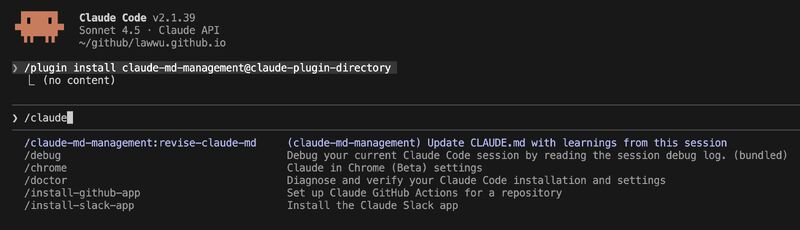
Day 4 - Auto Memory
Before talking about Claude Code’s auto memory feature, one thing to remember is you can use Claude Code itself to do a lot of its own configuration. This is rather meta like a 3-D printer printing pieces for itself. One example is you can ask Claude Code “can you search my previous claude messages for things i should add to my global CLAUDE.md?”
Another memory related feature that was added as of version 2.1.32 of Claude Code is Auto Memory. See Claude Code’s docs here: https://code.claude.com/docs/en/memory#manage-auto-memory
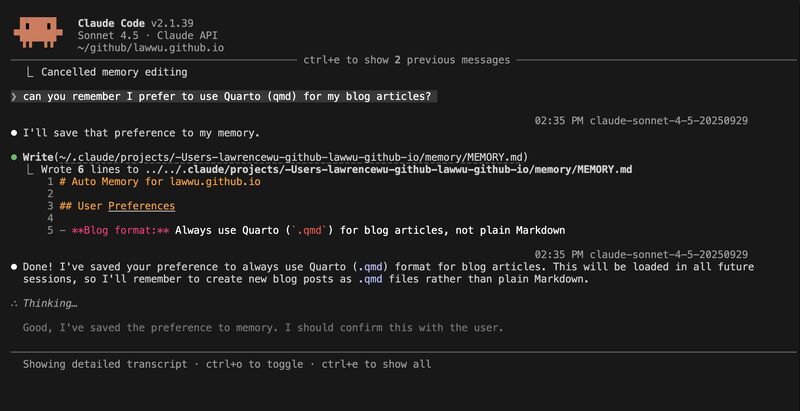
If you ask Claude Code to remember something it’ll write to a project specific memory folder in a markdown file here: ~/.claude/projects/<project>/memory/. These memories will be used across sessions in your current project. Though only the first 200 lines of the auto memories will be loaded.
From the official docs: “The directory contains a MEMORY.md entrypoint and optional topic files:
~/.claude/projects/<project>/memory/
├── MEMORY.md # Concise index, loaded into every session
├── debugging.md # Detailed notes on debugging patterns
├── api-conventions.md # API design decisions
└── ... # Any other topic files Claude creates- The first 200 lines of
MEMORY.mdare loaded into Claude’s system prompt at the start of every session. Content beyond 200 lines is not loaded automatically, and Claude is instructed to keep it concise by moving detailed notes into separate topic files. - Topic files like
debugging.mdorpatterns.mdare not loaded at startup. Claude reads them on demand using its standard file tools when it needs the information. - Claude reads and writes memory files during your session, so you’ll see memory updates happen as you work.”
If you type /memory you can see if auto memory is being used. See below for what writing this memory looks like:
Day 5 - Save Your Data
- Claude Code stores logs at:
~/.claude/projects/ - Only keeps 30 days by default
- Tip: Add
"cleanupPeriodDays": 99999to~/.claude/settings.jsonto preserve this valuable data
Remember you can also ask Claude Code to do these things too.
Day 6 - Use Plan Mode
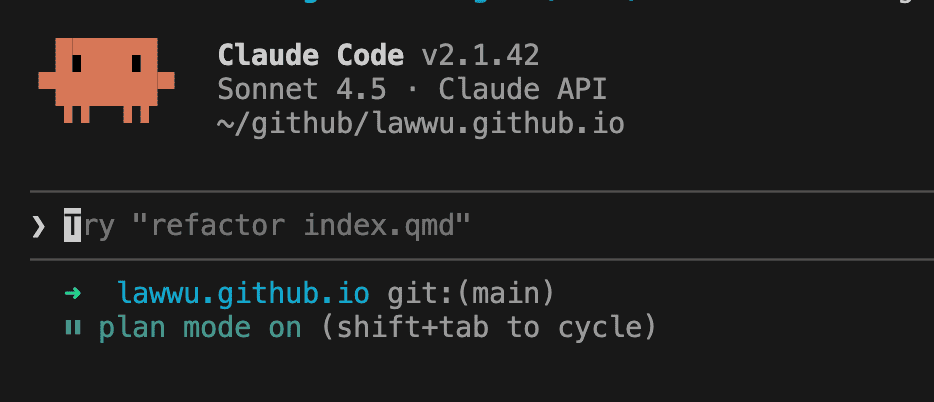
I usually like to use plan mode for more complicated tasks. Shift+Tab to enter plan mode (you should see “plan mode on” in green at the bottom. In this mode you can have some back and forth with Claude Code to first collaborate on a plan, then you approve it and then Claude will go off to implement your plan.
Some of the more complicated tasks I like to use plan mode for are:
- Large refactoring
- Creating machine learning pipelines
- Brainstorming with Claude
The official docs recommend you use plan mode when are you:
- Multi-step implementation: When your feature requires making edits to many files
- Code exploration: When you want to research the codebase thoroughly before changing anything
- Interactive development: When you want to iterate on the direction with Claude
The plans get written into your home directory: ~/.claude/plans/random-words.md
https://code.claude.com/docs/en/common-workflows#use-plan-mode-for-safe-code-analysis
Day 7 - Prefer CLIs to MCPs
One of the main breakthroughs Claude Code and other agentic coding terminals made was the Bash tool. Because Claude has been trained to use Bash so effectively and there are thousands of CLIs that run in Bash, Claude Code + CLIs pairs so well together.
MCPs had a lot of promise when they first came out. They still have a place. By implementing an MCP Server, you provide a common interface to any MCP Client. But the downside of MCP is you quickly fill up the context window of the underlying LLM you are using. The more MCPs you have configured, the worse this gets.
With CLIs, Claude Code can directly use them because the underlying model, Claude, has been “seen” so many instances of CLIs being used in the training data. So Claude Code already knows how to use the gh (Github) CLI, bq (BigQuery) CLI, ffmpeg, etc.
I much prefer the gh CLI to the Github MCP. I much prefer the bq CLI than the BigQuery MCP.
I’ve also experienced this with the Jira MCP which can be quite token expensive. Claude Code is more efficient calling the Jira API directly using a Python SDK (https://github.com/atlassian-api/atlassian-python-api).
One MCP Server I still like and have configured globally in Claude Code is DeepWiki: https://cognition.ai/blog/deepwiki-mcp-server
Armin Ronacher shares similar thoughts in his post: https://lucumr.pocoo.org/2025/12/13/skills-vs-mcp/
- Largely moved away from MCP, redone everything as skills
- Agents are better at writing their own tools — they customize and debug them
- MCP servers: you’re at mercy of their changes
Day 8 - Customize a statusline
You can configure the bottom two lines in the Claude Code terminal UI. Run the /statusline command to have Claude Code customize your statusline. You can customize it to show the percentage of your context window you are using, a running total of API costs, how long the session has been running, etc.
Official docs: https://code.claude.com/docs/en/statusline
Day 9 - Benefits of an LLM Gateway
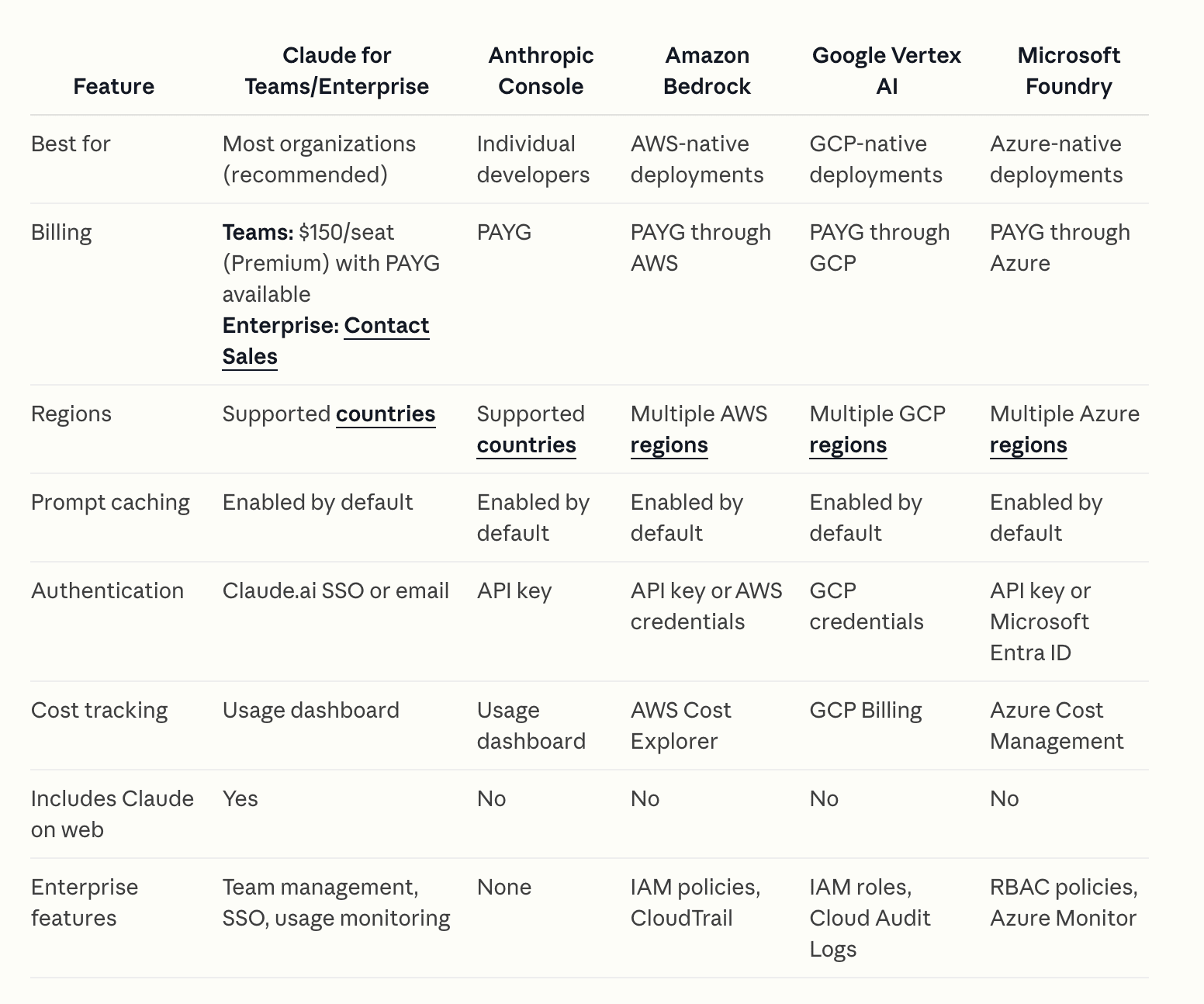
I think one of the reasons Claude Code exploded in popularity was because Anthropic did a good job establishing partnerships with all of the hyperscalers. You can use Claude Code with Claude models directly with Anthropic or through Amazon (Bedrock), GCP (VertexAI), or Azure (Foundry). Many companies have also established internal LLM Gateways like LiteLLM that have a lot of benefits. Some of the benefits I’ve seen:
- You can configure multiple provider’s models. Anthropic, OpenAI, Google models all exposed through a common interface. Open Source models can also be configured.
- You can log all of the LLM requests/responses.
- You can control costs and set budgets per user/team.
- You can swap models between different agentic harnesses. Claude Code with gpt-5.3-codex. Codex with Opus 4.6. Or you can use an open source harness like OpenCode with any model.
One downside of these internal LLM Gateways is they become a central place of failure. And if it goes down, your internal users’ productivity will plummet.
Day 10 — LLM vs Agentic Harness
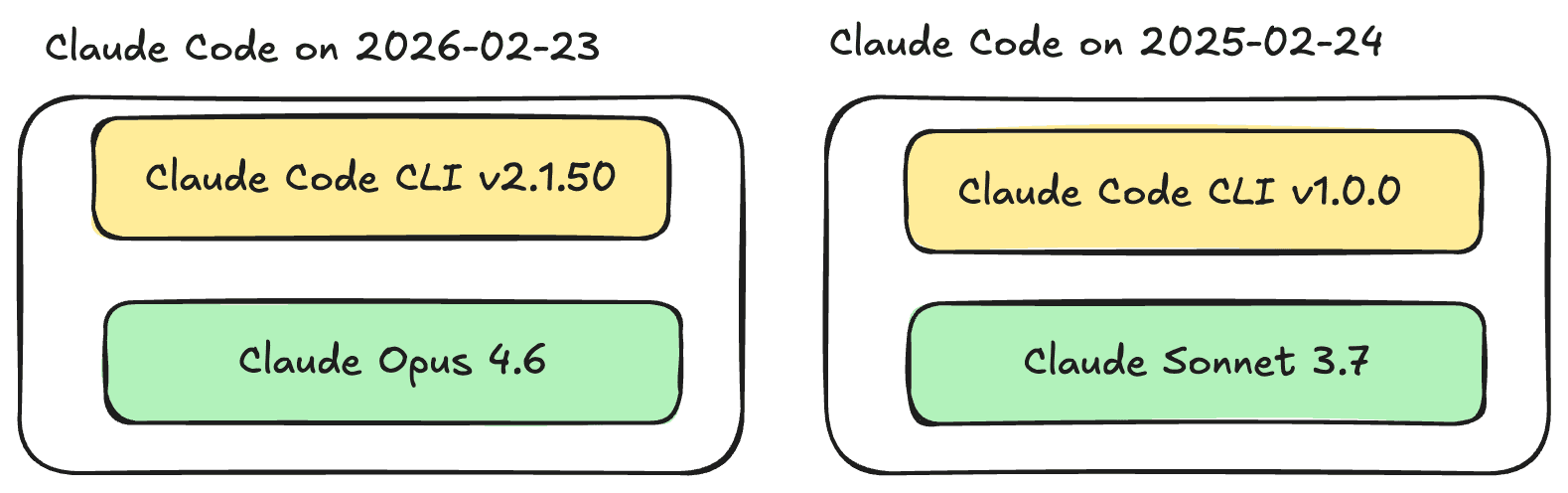
Remember, there is a difference between Claude Code and Claude the underlying model. Claude Code itself is just a CLI, I like to think of it as an agentic harness. It wraps a language model (Opus, Sonnet, Haiku or if you use LiteLLM, you can point it at any model). There are so many different agentic harnesses for coding agents now: Codex, gemini-cli, Claude Code and OpenCode.
The Claude Code CLI changes rapidly — see the CHANGELOG. Each version bumps the harness, not the underlying model. The harness handles: tool orchestration, context management, permissions, memory, prompt caching. There are system prompts embedded in the harness too.
Why does this matter? When Claude Code “gets better” it could be either the model OR the harness improving.
Boris Cherny in this interview talked about how he stuck with the terminal UI because he wanted to make as thin of a harness as possible so that improvements in model capability could be passed to the user. Claude Code recently turned 1 year old. It has gotten more feature rich. There has been an interesting project called Pi that I heard about because it’s the agent framework powering OpenClaw. Armin Ronacher writes about it here.
Day 11 — Terminal vs VS Code Extension
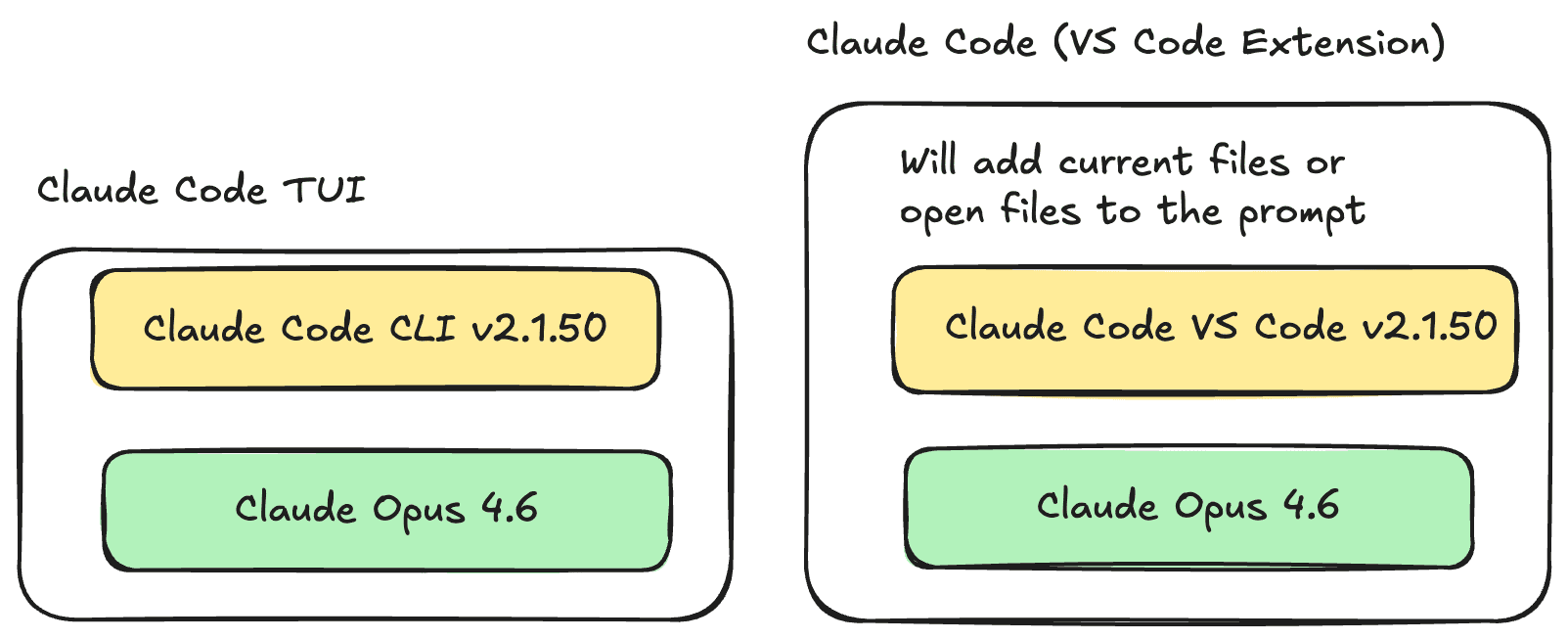
Claude Code started with a TUI (terminal UI). Since that time they’ve added a VS Code Extension and even a full-fledged UI in Claude Cowork which just wraps Claude Code. Yesterday I talked about how Claude Code is a type of agentic harness around the model. You can also think of the VS Code Extension and Claude Cowork as different harness around the same model. As you can see in the picture, I think of the VS Code Extension as a “thicker” harness in that it adds behavior that the underlying framework doesn’t do.
Different harnesses have different behaviors. The VS Code Extension automatically adds opened file / selected lines as part of your prompt. This silently increases token usage and may send unintended context to the LLM. I’ve never had the TUI add files I didn’t expect.
The VS Code extension does add a nice UI to visualize tool outputs that I like.
Day 12 — Setup PeonPing
I’ve really enjoyed using Peon Ping for the last few weeks. It adds a Claude Code hook at the beginning and end of each session. It notifies you with a system notification and a custom sound. The default is a Warcraft III peon. There’s also sounds from Starcaft and Age of Empires and a bunch of other goodies. The sounds are fun but it’s genuinly useful knowing when the agent finishes it’s task.
It initially was for Claude Code but they’ve recently added support for most coding agents now.
Day 13 — Claude Code GitHub Actions
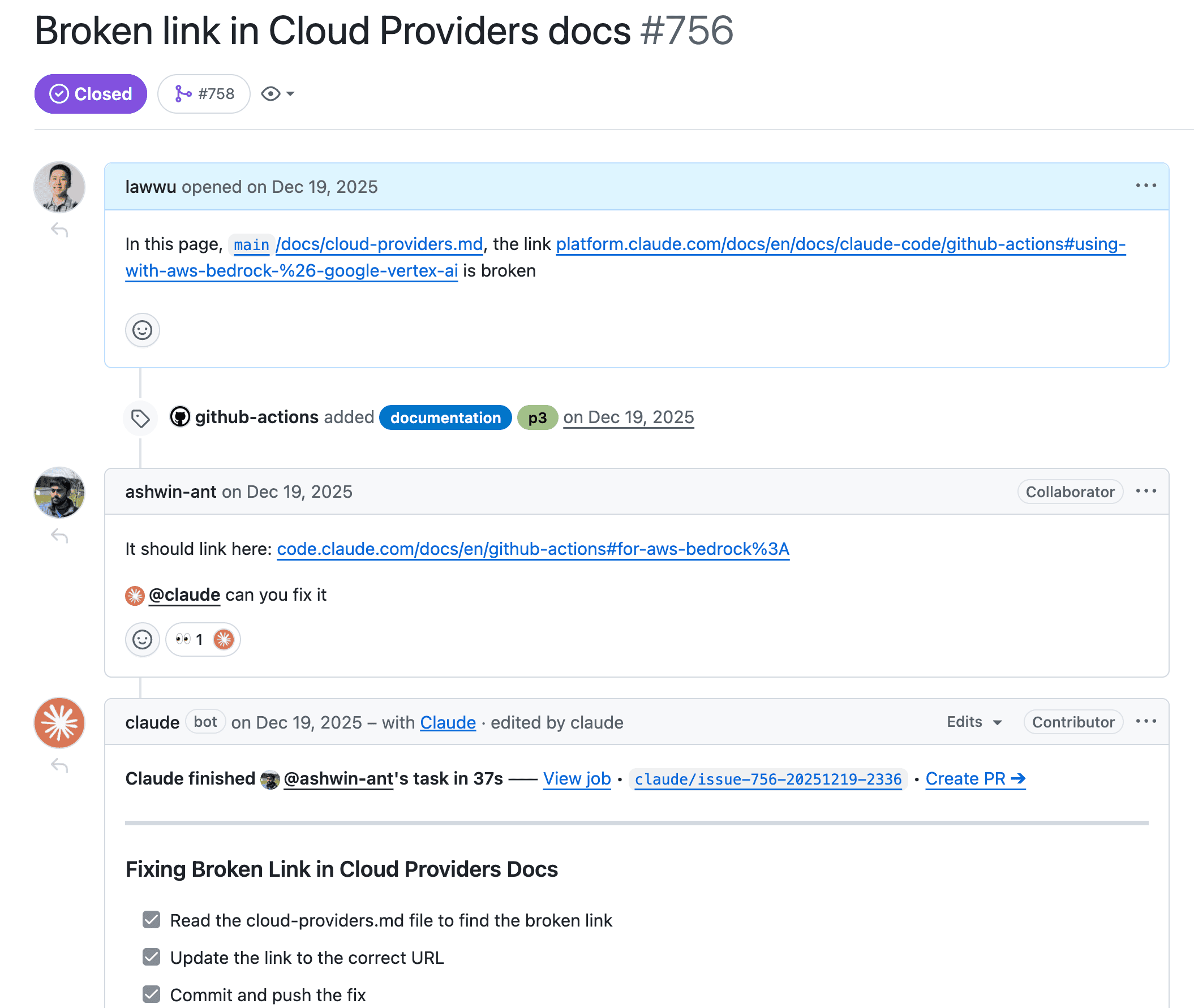
You can run Claude Code in your Github Actions. Anthropic has an official action here: https://github.com/anthropics/claude-code-action.
I’ve used this Github Action to mainly review PRs but also generate commits and PRs. I was inspired to set this up when I saw the Anthropic team close an issue I opened by just tagging “@claude can you fix it” and passing a link. Amazing.
The Claude Code Github Action is another agentic harness. It actually uses the Claude Agent SDK under the hood with a custom prompt specifically for Github. For example it largely communicates through Github Issues. But it’s amazing just to see the checklist update in realtime and also a link to create a PR from the branch Claude made.
It’s pretty easy to setup. You can even use Claude Code to set this up for you in your Github repo.
Day 14 — Don’t Outpace Your Understanding
Don’t allow the agent to outpace your understanding of whatever you are building. The models can still make mistakes. You need to have some understanding of the system in order to validate what the agent is doing. Your understanding of the system is also critical to guide future changes and validate correctness
Practical tips:
- Use plan mode (Day 6) for complex tasks — review the plan before executing
- Read the code/diffs, don’t just approve them
- Ask Claude to explain its changes: “why did you do it this way?”
- Keep AGENTS.md updated so future sessions have context on architectural decisions
- When Claude writes code you don’t understand, stop and learn before moving on
This is even more important when using multiple agents (Codex + Claude Code) — you’re the one who has to maintain the codebase (at least for now?)
Day 15 - Prompt Caching
“We build our entire harness around prompt caching” - Thariq (Claude Code dev)
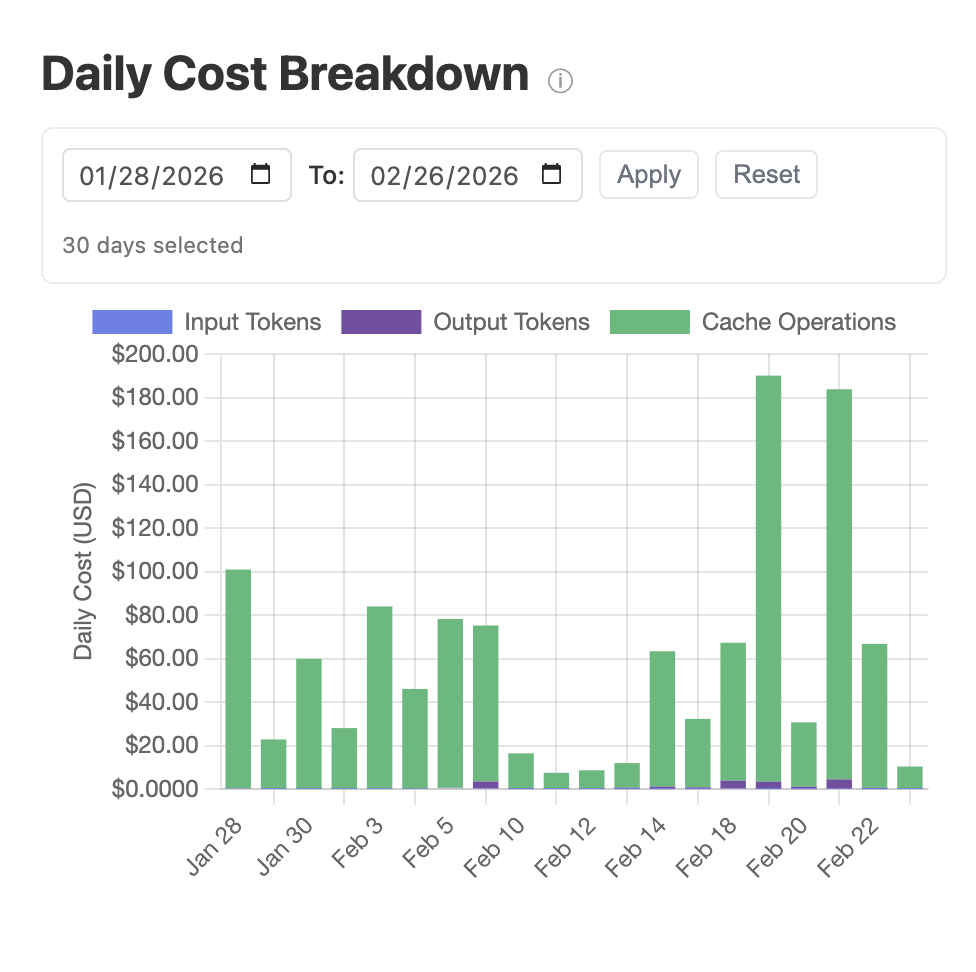
I’ve really liked Chip Huyen’s sniffly project to visualize Claude Code stats. One of the graphs shows you the daily cost of your tokens by input tokens, output tokens and cache operations. I always thought this graph was wrong because it looked like 99% of the cost was cache operations. But I realized it wasn’t wrong.
I underestimated the importance of prompt caching. Cached tokens are 10% the cost of regular tokens (!). This means Claude Code structures static content first and dynamic content later in the prompt:
- System Prompt & Tools (global cache)
- CLAUDE.md (cached within a porject)
- Session context (cached within a session)
- Conversation messages
I didn’t appreciate how much engineering and effort goes into making the user experience in Claude Code what it is AND keeping the costs maintainable.
If you are building your own AI systems on top of LLM APIs that support prompt caching, you need to design your system with prompt caching at the forefront of your mind. Looking at the Claude Code CHANGELOG, you can see there are dedicated releases for fixing things that led to reduced cache hit rates, e.g. 2.1.62.
Thariq has a good post on the importance of prompt caching that was so illuminating: https://x.com/trq212/status/2024574133011673516?s=46&t=Ze-VKnGNxPI5bjU_St2Wbg